


Ce script créé par mes soins permet d'exporter la liste des certificats installées avec leurs dates d'expiration dans un rapport HTML (trié par date). Les données ainsi que le rapport seront ensuite envoyés automatiquement par mail.
Fonctionnalités :
- Exporter la liste des certificats installées avec leurs dates d'expiration (Colonnes récupérées : FriendlyName, Start date, End date, Expires in, Thumbprint)
- Exporter les données dans un fichier .csv (trié par date)
- Exporter les données dans un rapport HTML (trié par date)
- Envoyer les données ainsi que le rapport HTML par mail
Utilisation :
- Compléter les variables suivantes dans le script :
- $MailFrom = "UserName[at]mail.fr" (Adresse mail de l'expéditeur)
- $MailTo = "UserName[at]mail.fr" (Adresse mail du destinataire)
- $MailSMTPServer = "SMTPServerName" (Serveur SMTP)
- $MailSMTPPort = "PortNumber" (Numéro du port SMTP)
Screenshot :
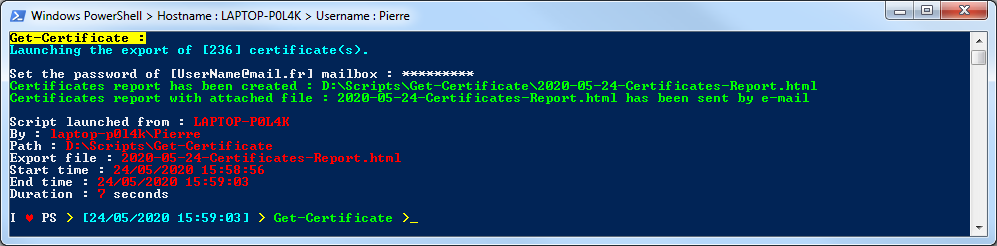
Code du script :
<#
.SYNOPSIS
    Export certificates list with their expiration dates
.DESCRIPTION
    Export certificates list with their expiration dates and sent the HTML report by email
.NOTES
    File name : Get-Certificate.ps1
    Author : Pierre JACQUOT
    Date : 24/05/2020
    Version : 1.0
.LINK
    Website : https://www.pierrejacquot.yo.fr
    Reference : https://www.pierrejacquot.yo.fr/index.php/scripts/45-script-get-certificate
#>

Clear-Host

$StartTime = Get-Date -Format "dd/MM/yyyy HH:mm:ss"
[string]$Hostname = [Environment]::MachineName
[string]$Login = [System.Security.Principal.WindowsIdentity]::GetCurrent().Name
[string]$Workfolder = Split-Path $MyInvocation.MyCommand.Path
[string]$Date = Get-Date -UFormat "%Y-%m-%d"
[string]$ExportFile = $Workfolder + "\$Date-Certificates-Report.html"
[array]$Certificates = Get-ChildItem -Path Cert:\LocalMachine\Root\ | Sort-Object NotAfter | Select-Object FriendlyName, @{Name="Start date";Expression={$_.NotBefore}}, @{Name="End date";Expression={$_.NotAfter}}, @{Name="Expires in";Expression={($_.NotAfter – (Get-Date))}}, Thumbprint
[int]$CertificatesNumbers = $Certificates.Count
[string]$Activity = "Trying to launch the export of [$CertificatesNumbers] certificate(s)"
[int]$Step = 1

Write-Host "Get-Certificate :" -ForegroundColor Black -BackgroundColor Yellow
Write-Host "Launching the export of [$CertificatesNumbers] certificate(s)." -ForegroundColor Cyan
Write-Host "`r"

If ($CertificatesNumbers -ge 1) {
    [string]$MailFrom = "UserName[at]mail.fr"
    [string]$MailTo = "UserName[at]mail.fr"
    [string]$MailSubject = "[$Date] - Certificate(s) report on : $Hostname"
    [string]$MailSMTPServer = "SMTPServerName"
    [int]$MailSMTPPort = "PortNumber"

    [string]$Style="<title>$MailSubject</title>
    <style>
        h1 { font-family: Arial; color: #e68a00; font-size: 28px; }
        h2 { font-family: Arial; color: #000000; font-size: 16px; }
        table {	border: 0px; font-family: Arial; }
        td { padding: 4px; margin: 0px; font-size: 12px; }
        th { background: linear-gradient(#49708f, #293f50); color: #ffffff; font-size: 11px; padding: 10px 15px; }
        tr:nth-child(even) { background-color: #f0f0f2; }
        tr:hover { background-color: #ddd; }
        .ExpiratedStatus { background-color: #000000; font-weight: bold; color: #ffffff; }
        .CriticalStatus { background-color: #ff0000; font-weight: bold; color: #ffffff; }
        .WarningStatus { background-color: #ffa500; font-weight: bold; color: #ffffff; }
        .SuccessStatus { background-color: #008000; font-weight: bold; color: #ffffff; }
        #PostContent { font-family: Arial; font-size: 11px; font-style: italic; }
        span.PostContentBlue { color: #000099; }
    </style>"

    [string]$PreContent = "<h1>Certificate(s) overview : $Date</h1><h2>Number of certificate(s) : <span class='PostContentBlue'>$CertificatesNumbers</span> on <span class='PostContentBlue'>$Hostname</span></h2>"
    [string]$CertificatesHTML = Get-ChildItem -Path Cert:\LocalMachine\Root\ | Sort-Object NotAfter | Select-Object FriendlyName, @{Name="Start date";Expression={$_.NotBefore}}, @{Name="End date";Expression={$_.NotAfter}}, @{Name="Expires in";Expression={($_.NotAfter – (Get-Date)).Days}}, Thumbprint | ConvertTo-Html -As Table -Fragment -PreContent $PreContent

    ForEach ($Certificate in $Certificates) {
        [string]$CertifName = $Certificate.FriendlyName
        $CertifStart = $Certificate."Start date"
        $CertifEnd = $Certificate."End date"
        $Expiresin = $Certificate."Expires in"
        $ExpiresinDays = $Expiresin.Days
        $ExpiresinHours = $Expiresin.Hours
        $ExpiresinMinutes = $Expiresin.Minutes
        $ExpiresinSeconds = $Expiresin.Seconds
        [string]$CertifThumbprint = $Certificate.Thumbprint
        [string]$Status = "Processing [$Step] of [$CertificatesNumbers] - $(([math]::Round((($Step)/$CertificatesNumbers*100),0)))% completed"
        [string]$CurrentOperation = "Exporting certificate : Name $CertifName - Start date : $(Get-Date $CertifStart -Format "dd/MM/yyyy HH:mm:ss") - End date : $(Get-Date $CertifEnd -Format "dd/MM/yyyy HH:mm:ss")"
        Write-Progress -Activity $Activity -Status $Status -CurrentOperation $CurrentOperation -PercentComplete ($Step/$CertificatesNumbers*100)
        $Step++
        If ($CertifEnd -le (Get-Date)) {
            $CertificatesHTML = $CertificatesHTML -replace "<td>$(Get-Date $CertifEnd -Format 'dd/MM/yyyy HH:mm:ss')</td><td>$ExpiresinDays</td>","<td class='CriticalStatus'>$(Get-Date $CertifEnd -Format 'dd/MM/yyyy HH:mm:ss')</td><td class='ExpiratedStatus'>This certificate has expired</td>"
        }
        Else {
            If ($ExpiresinDays -le 10) {
                $CertificatesHTML = $CertificatesHTML -replace "<td>$(Get-Date $CertifEnd -Format 'dd/MM/yyyy HH:mm:ss')</td><td>$ExpiresinDays</td>","<td class='SuccessStatus'>$(Get-Date $CertifEnd -Format 'dd/MM/yyyy HH:mm:ss')</td><td class='CriticalStatus'>$ExpiresinDays days $($ExpiresinHours):$($ExpiresinMinutes):$($ExpiresinSeconds)</td>"
            }
            ElseIf ($ExpiresinDays -ge 11 -and $ExpiresinDays -le 30) {
                $CertificatesHTML = $CertificatesHTML -replace "<td>$(Get-Date $CertifEnd -Format 'dd/MM/yyyy HH:mm:ss')</td><td>$ExpiresinDays</td>","<td class='SuccessStatus'>$(Get-Date $CertifEnd -Format 'dd/MM/yyyy HH:mm:ss')</td><td class='WarningStatus'>$ExpiresinDays days $($ExpiresinHours):$($ExpiresinMinutes):$($ExpiresinSeconds)</td>"
            }
            Else {
                $CertificatesHTML = $CertificatesHTML -replace "<td>$(Get-Date $CertifEnd -Format 'dd/MM/yyyy HH:mm:ss')</td><td>$ExpiresinDays</td>","<td class='SuccessStatus'>$(Get-Date $CertifEnd -Format 'dd/MM/yyyy HH:mm:ss')</td><td class='SuccessStatus'>$ExpiresinDays days $($ExpiresinHours):$($ExpiresinMinutes):$($ExpiresinSeconds)</td>"
            }
        }
    }

    Do {
        $MailPass = Read-Host "Set the password of [$MailTo] mailbox " -AsSecureString
        $MailPassword = [Runtime.InteropServices.Marshal]::PtrToStringAuto([Runtime.InteropServices.Marshal]::SecureStringToBSTR($MailPass))
        If ($MailPassword -eq "") {
            Write-Host "Password is mandatory !" -ForegroundColor Red
            Write-Host "`r"
        }
    } Until ($MailPassword -ne "")

    $Credential = New-Object -TypeName System.Management.Automation.PSCredential -ArgumentList $MailTo, $MailPass

    $EndTime = Get-Date -Format "dd/MM/yyyy HH:mm:ss"
    [decimal]$Duration = [math]::Round((New-TimeSpan -Start $StartTime -End $EndTime).TotalSeconds,2)

    [string]$PostContent = "<p id='PostContent'>Script launched from : <span class='PostContentBlue'>$Hostname</span><br/>By : <span class='PostContentBlue'>$Login</span><br/>Path : <span class='PostContentBlue'>$Workfolder</span><br/>Export file : <span class='PostContentBlue'>$(Split-Path $ExportFile -Leaf)</span><br/>Start time : <span class='PostContentBlue'>$StartTime</span><br/>End time : <span class='PostContentBlue'>$EndTime</span><br/>Duration : <span class='PostContentBlue'>$Duration</span> seconds</p>"
    [string]$Report = ConvertTo-Html -Body "$CertificatesHTML" -Head $Style -PostContent $PostContent
    $Report | Out-File -FilePath $ExportFile -Encoding utf8
    Write-Host "Certificates report has been created : $ExportFile" -ForegroundColor Green

    Try {
        Send-MailMessage -From $MailFrom -To $MailTo -Subject $MailSubject -Body $Report -Priority High -Attachments $ExportFile -SmtpServer $MailSMTPServer -Port $MailSMTPPort -UseSsl -Credential $Credential -BodyAsHtml -Encoding UTF8
        Write-Host "Certificates report with attached file : $(Split-Path $ExportFile -Leaf) has been sent by e-mail" -ForegroundColor Green
    }
    Catch {
        [string]$ErrorMessage = $_.Exception.Message
        Write-Host $ErrorMessage -ForegroundColor Red
    }
}

Write-Host "`r"
Write-Host "Script launched from : " -NoNewline; Write-Host $Hostname -ForegroundColor Red
Write-Host "By : " -NoNewline; Write-Host $Login -ForegroundColor Red
Write-Host "Path : " -NoNewline; Write-Host $Workfolder -ForegroundColor Red
Write-Host "Export file : " -NoNewline; Write-Host (Split-Path $ExportFile -Leaf) -ForegroundColor Red
Write-Host "Start time : " -NoNewline; Write-Host $StartTime -ForegroundColor Red
Write-Host "End time : " -NoNewline; Write-Host $EndTime -ForegroundColor Red
Write-Host "Duration : " -NoNewline; Write-Host $Duration -ForegroundColor Red -nonewline; Write-Host " seconds"
Write-Host "`r"
Cliquer ici pour visualiser un exemple du rapport Certificates-Report.html créé automatiquement depuis mon poste.
Cliquer ici pour télécharger le script.


